
 Get GNU / Linux
 News Feed
 Blogs
Blogs Event Photos
 Screen Shots
 Polls
Polls Popular Content
 Members
 Search
 Wall Papers
Using YUM
Using Yum
No doubt that every single Yellow-Dog and Fedora user knows this awesome tool named YUM. In this article we will know what is YUM and how to use it and what are the advantages and disadvantages that exist in YUM. We will also talk a little bit about the yum.conf file. And finally we will get to know some useful links related to YUM. Here we go !. :)
What is YUM ?
YUM is an interactive, automated update program which can be used for maintaining systems using rpm . Meaning; You can use YUM to install new rpm packages or update exisiting packages. The word YUM stands for "Yellowdog Updater Modified".
The yum.conf File :
YUM uses a configuration file named yum.conf this Configuration File is found in /etc/yum.conf. This yum.conf contains the configuration data needed by YUM . Such as the Debug Level, Cache Directory and finally and the most important are the URL's of the Fedora and YUM repositories which are needed inorder to get the requested packages from them. You can build up a yum.conf file by yourself but first you will need to check the "yum.conf" Manual Page in order to know more details concerning this configuration file
$ man yum.conf
Or you can get a Ready and Updated ''yum.conf''.
How Can I use YUM ???
In this part we will get to know the basic commands and uses for YUM ... But first we have to configure our "yum.conf" file as stated in the above section and second you have to be using the root account as we will be dealing with rpm's installation and updates or you can switch from your account to the root account by using this command
$ su root
Now , some of the basic and important commands that you should know inorder To be able To use YUM.
Installing a package
# yum install Package1 Package2 Package3 ...
This command is used to install the latest version of a package or a group of packages while making sure that all the dependencies (The extra packages that the installed package needs inorder to work properly) are satisfied.
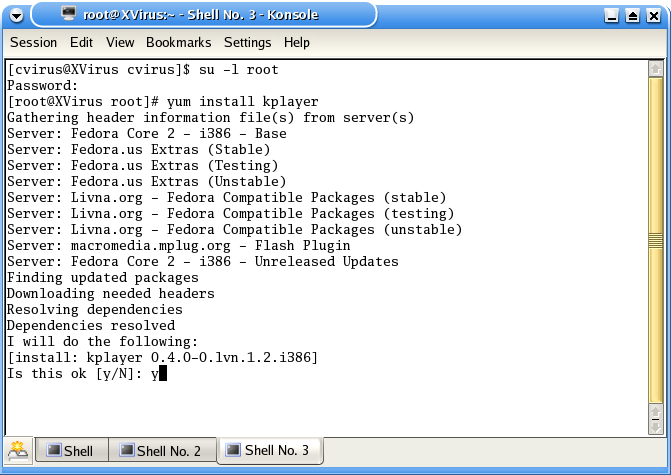
Here is a screenshot of YUM while it is installing "Kplayer" using this command that we've discussed:
Note
Before you start getting packages from any repository using YUM ... You need To download the Header Files (YUM does this Automaticly). Every rpm has a header, that header contains a complete file list, package descriptions, lists of what features it provides, lists of what it requires, what it conflicts with ... In order for rpm to make a decision about what it will need to be installed, it needs the information in the header ... What Yum does is to copy the header from the repository, then the client part of yum uses those headers to determine what needs to be Installed/Upgraded/Erased.
Updating Packages
# yum update Package1 Package2 Package3
This command updates the listed packages which are given as arguments to YUM while ensuring that all dependencies are satisfied ... If this command is ran without an argument list (Packages List) ... It updates every single package installed on your system ... Aint this pretty good ? hehe ... :)
Searching For Packages
# yum search [...]
This command is used to find any packages matching the argument you gave in the Package Name, Description, Summary. This command is useful if you only know a peice of the package name or somethin' related to it.
Uninstalling Packages
# yum remove Package1 Package2 Package3
This command is used to remove the specified packages from your system as well as removing any packages which depend on the package being removed.
Note These are the most important commands of YUM ... For more commands read the Manual page
$ man yum
What are the Advantages and Disadvantages of YUM ???
Advantages
YUM is relatively pretty and relatively nice and has significantly less legacy baggage than "apt" {Software Similar To YUM} ... Size of codebase in apt (find -name \*.cc | xargs wc -l):40141 and the size of codebase in YUM (find -name \*.py | xargs wc -l):4681.
Disadvantages
hmmm ... Really didn't see any disadvantages ... Then the answer is NONE !
Some Links Related To YUM
Nuthin's Left ... CYA Later
CVirus
